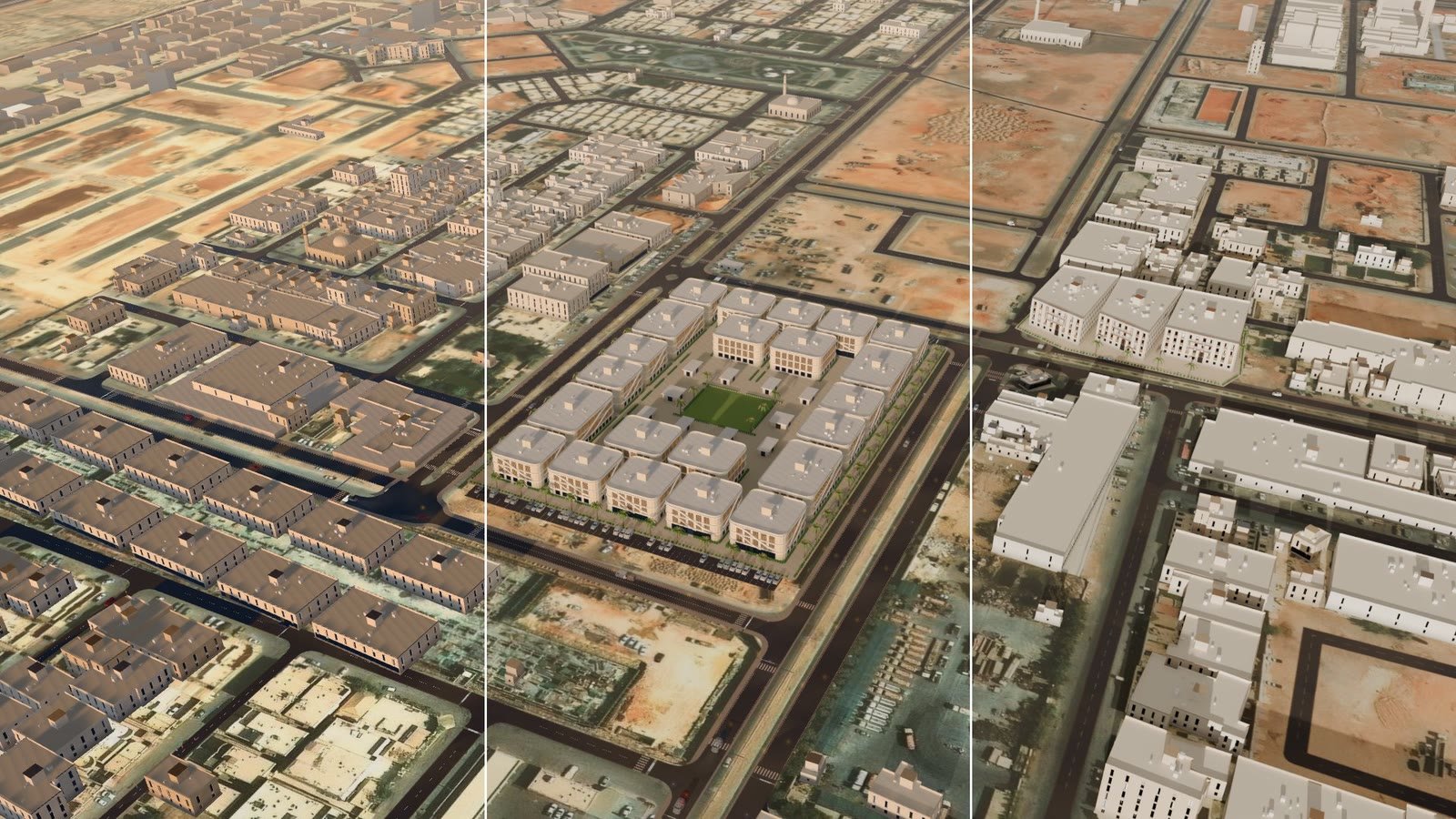
Summary: AI rendering turns a plain 3D render into a photographic still for USD 0.08 to 0.21, and it loses part of the design on the way. In our test on a residential compound in Riyadh, three image models kept between about 50% and 80% of our model’s lines, and all of them invented surroundings. Get the design right in the 3D model, render it from a known camera, and use AI as a finishing pass on stills.
Ask our live 3D map of Riyadh for zoom 18.5 and a 75-degree tilt, and it gives you 16.5 and 60. That cap is deliberate. Closer in, a map built for a whole city starts to look like a model, and someone buying a home in a residential compound wants to see the home. So a click on the compound fades in a render, shot from the map’s own camera, in 350 milliseconds. When it works, nobody notices the swap.
A live map and a render are good at opposite things
A live map is interactive and city-wide. Every building around the project is the real one at its real distance, so drive times and window views come out true. Its weak spot is the close-up, where hedges are boxes and palms look like props.
A render looks finished, and it’s fixed: one camera, and every new angle is another render pass.
We took apart several property sales apps first. Every good-looking exterior was pre-rendered, and the live 3D ones never reached render quality. The one app that went from a map to a render cut through a loading screen. Its render faces roughly west while the map looks north-north-west, and only a camera move on each side of the cut makes it feel continuous.
We wanted the map’s facts and the render’s looks, with no cut. The map side is the kind of city twin we build from open data.
Cap the map, then hand off to a camera-matched render
The hand-off runs like this:
- The map stops at zoom 16.5 and a 60-degree pitch, where the city model still holds up.
- A click on the compound cross-fades to the first frame of the render in 350 ms.
- A 60-frame bridge flies down into a 120-frame orbit you can drag.
- At four stops a three-second loop plays the map’s animated traffic: 294 cars and pedestrians sampled from the live map and posed in Blender.
- Back plays the bridge in reverse and fades to the map, which never unloaded.
The frames are 2592×1080, a 2.4:1 strip drawn at screen height, so the render covers any screen. (Our first version was 16:9, and wide screens showed the map at the sides.)
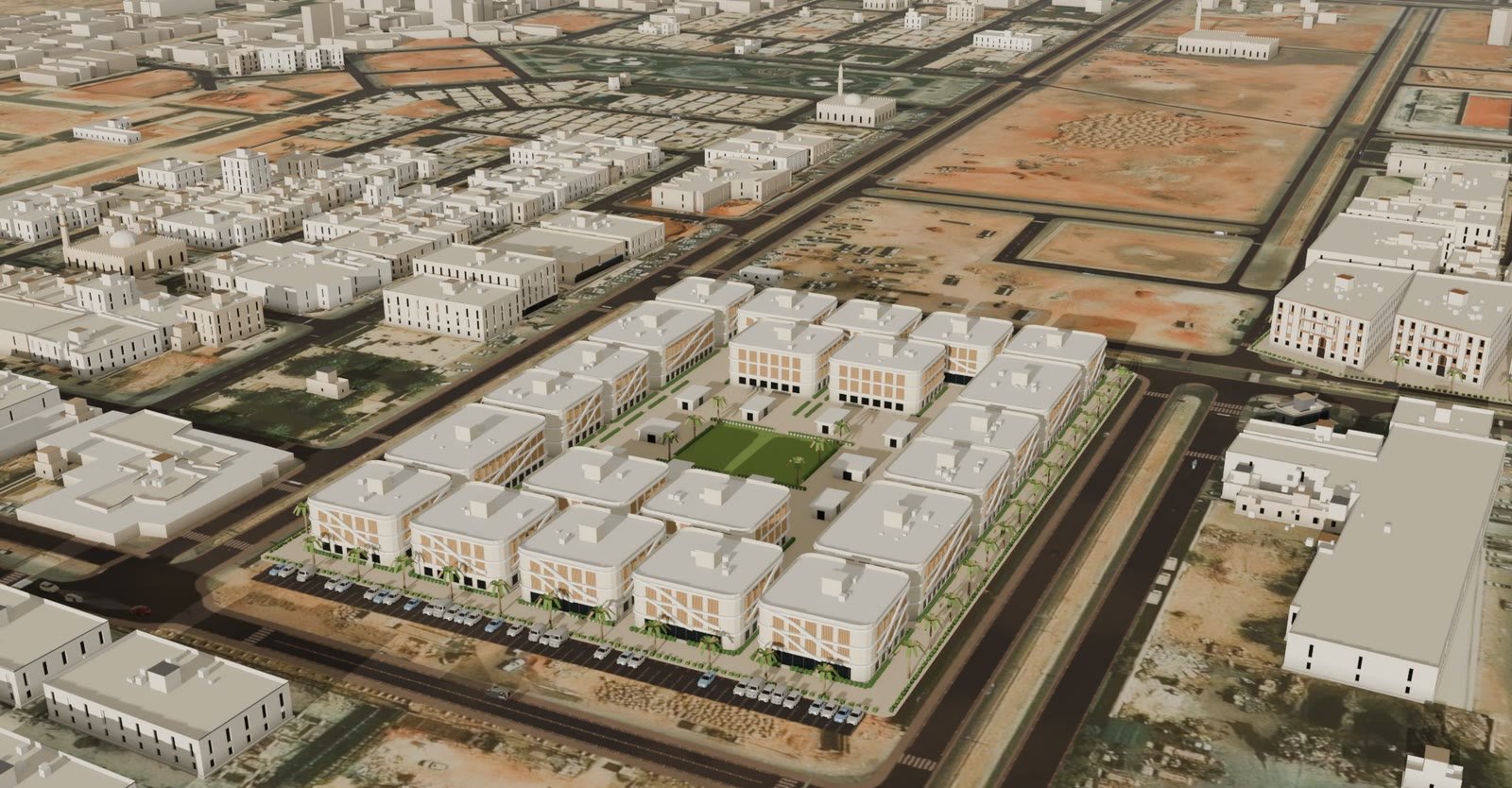
Between the stops the orbit is still, the same limit as every pre-rendered player we looked at. Traffic that moves at every angle needs a live engine, which is what pixel streaming gives you.
The camera match is off by a thousandth of a pixel
We export the scene at the hand-off camera: the map’s frame, its camera, every raised 3D object within 4 km as glTF, and the flat imagery and roads shot from above. Blender rebuilds it, puts its camera exactly where the map’s is, lights it with the map’s sun and renders.
Over 42 points on the project, Blender’s camera lands a median of 0.001 px (worst 0.002 px) from where the map’s own projection puts them. Frame 0 sits 0.4 px off the map’s frame, with a structure correlation of 0.78. To prove that number means something we shifted the render on purpose: 3 px drops it to 0.60, 8 px to 0.30, 20 px to 0.12, and a mirrored copy scores zero. A 50/50 blend of the two frames shows one picture.
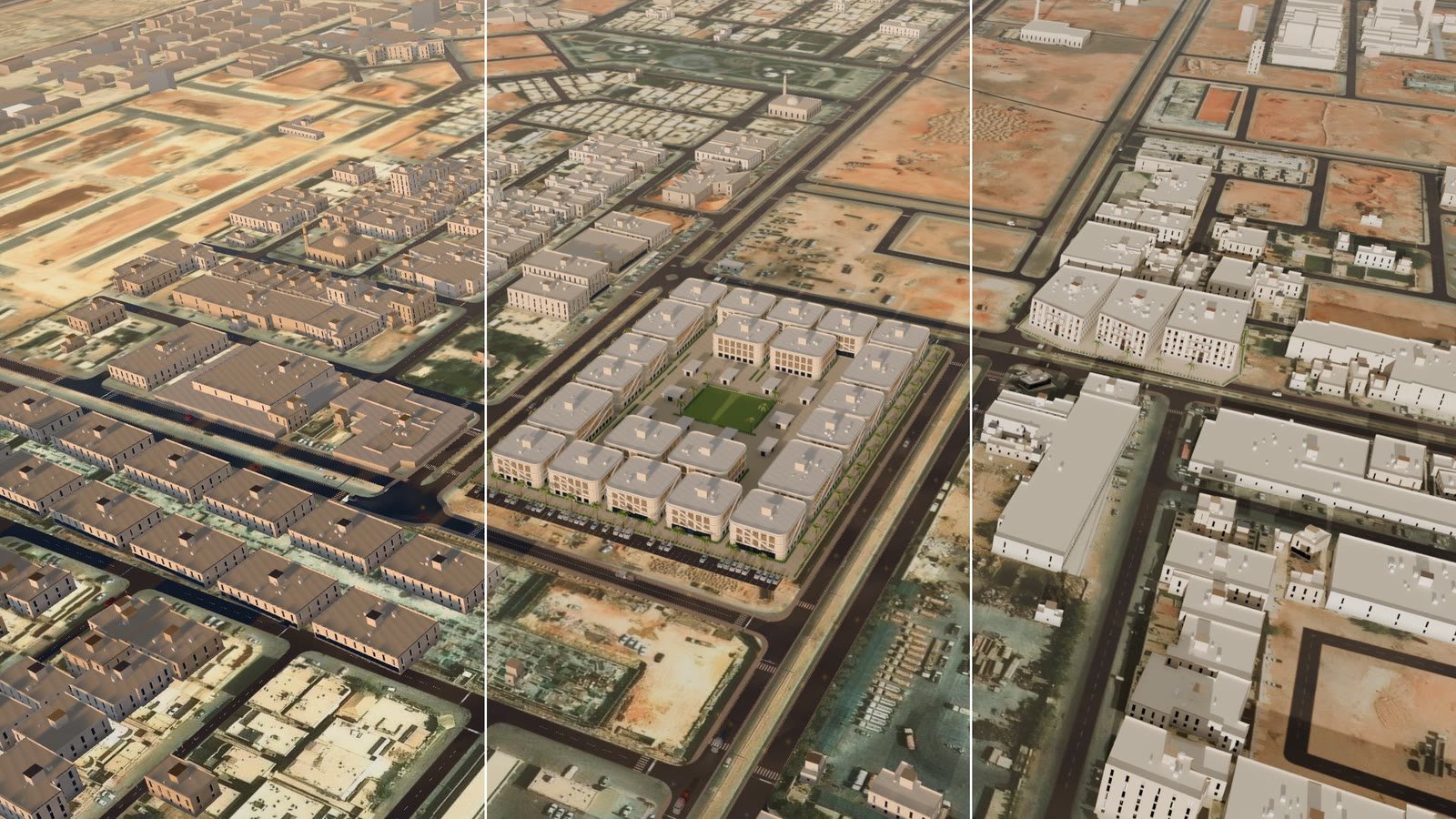
The risk moved from code to content. A cross-fade shows every building that differs from the map, which means the bridge has to come from our own geometry. A studio render with an invented skyline fits only at the end of it, shot from our camera with our context model.
The lens trap: 13.6 degrees instead of 36.87
The worst bug of the test passed its own check.
The map’s 3D layer keeps its projection matrix in map pixel units. Read the field of view the usual way, 2·atan(1/P[5]), and you get 13.6 degrees. The right reading for this matrix is 2·atan(-P[11]/P[5]): 36.87 degrees. Our first camera check passed anyway, because it compared Blender with a pinhole camera built from the same wrong numbers. Of course they agreed. Test a renderer only against the map’s own projection function.
Three smaller traps:
- Some context buildings are wound inside out. The map hides this by drawing one side of each wall; Cycles shades those walls black.
- A low afternoon sun under a physical sky turns the desert blue. Light the scene with a warm fill and keep the sky for the background.
- Untagged H.264 loops decode darker than the WebP still they start from. Tag them BT.709.
What AI rendering keeps of your design
Our render is our model in good light: accurate, and plainly a model. So we asked three image models to make it look like a photograph.
Each got the same aerial frame of the compound and one instruction: make it a photograph, and keep the camera and every building, storey and road. Then we measured what survived: the share of edges in our render that turn up within 3 pixels in the 2048×1152 AI still, counted on the compound only.
| Our model’s lines kept | Cost per still (USD) | Context it invented | |
|---|---|---|---|
| Image model A | about 50% | 0.21 | palm-lined medians, trucks, air-conditioning units on the roofs |
| Image model B | 68-69% | 0.08, or 0.21 at its top quality setting | trees and medians across the neighbourhood; at the top setting, people and street lights |
| Image model C | 80% | 0.08 | trees and medians across the neighbourhood |
Model A kept the buildings in place, within a few pixels, and still lost about half of our lines.
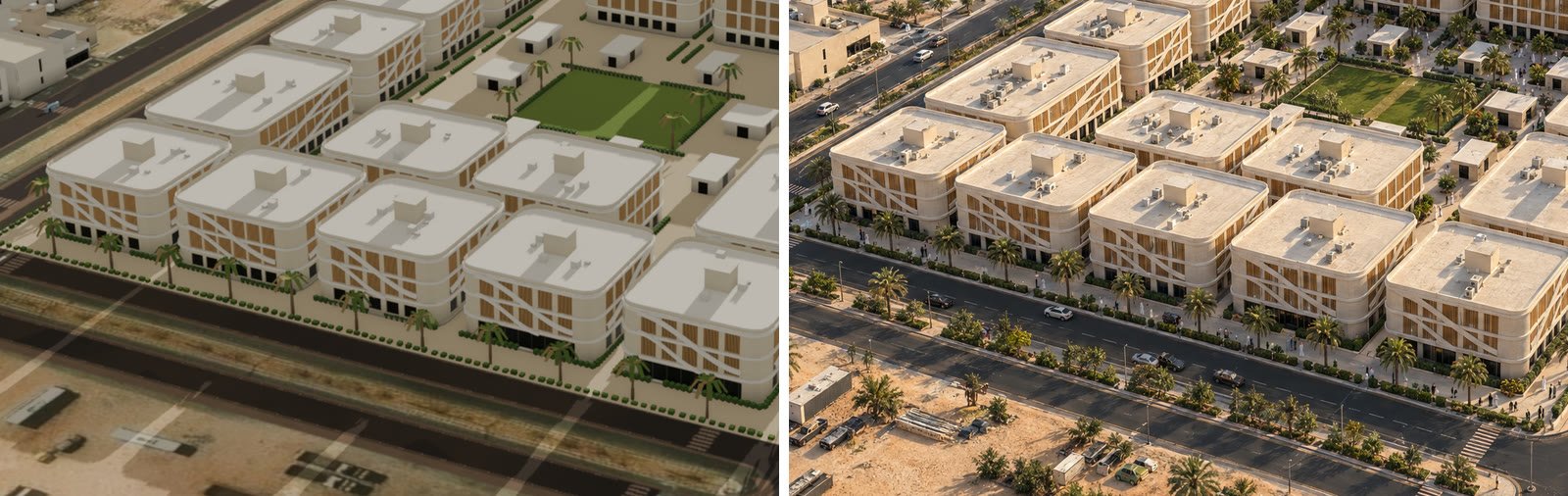
Design accuracy has to come from the model
That fixes the order of work. The design lives in the 3D model. The render comes from a known camera, so it lines up with the map and unit outlines can be projected onto it. AI finishing goes last, on stills only, each checked with an edge overlay against its render.
If the facade in your model is a placeholder, the AI still shows a placeholder too, just better lit. And a palm-lined median that nobody designed shows buyers a street the developer never promised.
The orbit and the bridge stay free of AI, since those frames must match the map and each other. At eye level, where the map’s hedges and palms fail, we render street stills in Cycles with scanned date palms, car models and people. (Each CC-BY model needs its credit line wherever the render appears. Easy to forget.)
What to check before you commission renders for a sales app
- The camera of every render: position, heading, pitch and lens. Without it, someone has to solve the camera from five or six matched points before the render lines up with the map or carries unit outlines.
- A seam test against the map’s own projection, with shifted copies as controls. A check against the studio’s own numbers proves nothing; ours passed with a lens almost three times too narrow.
- Where the surroundings come from: the map’s geometry or an artist’s imagination. Only the first survives a cross-fade.
- An edge overlay for every AI-finished still, plus a list of what the model added.
- Phone weight. Our desktop player carries 70 MB of frames and loops; phones need a 1280-pixel set, progressive loading and a CDN.
- Written terms of use for every render and scanned asset.
Frequently asked questions
Can an image model replace a 3D model for property marketing?
No. In our test the best of three image models kept 80% of our model’s lines and the weakest about 50%, and all three added things that are not in the design. Use the 3D model for the design and the image model for the finish.
How do you match a render to a live 3D map?
Export the map’s camera and scene at the hand-off point, rebuild the scene in Blender with the same camera, and check it against the map’s own projection. Ours landed a median of 0.001 px off over 42 points.
Why cap the zoom of a 3D city map?
A model built for a whole city looks plain up close. We cap ours at zoom 16.5 and a 60-degree pitch, and a click on the building opens the render for anything closer.
How much does an AI-finished still cost?
The models we tested charged USD 0.08 to 0.21 per 2048×1152 still. The real cost is the check: an edge overlay against the source render shows what the model dropped and what it made up.
Next step
If you want a 3D map of your project that hands off to renders buyers can trust, see our digital twin work or get in touch.
What we build: digital twins in the UAE.
