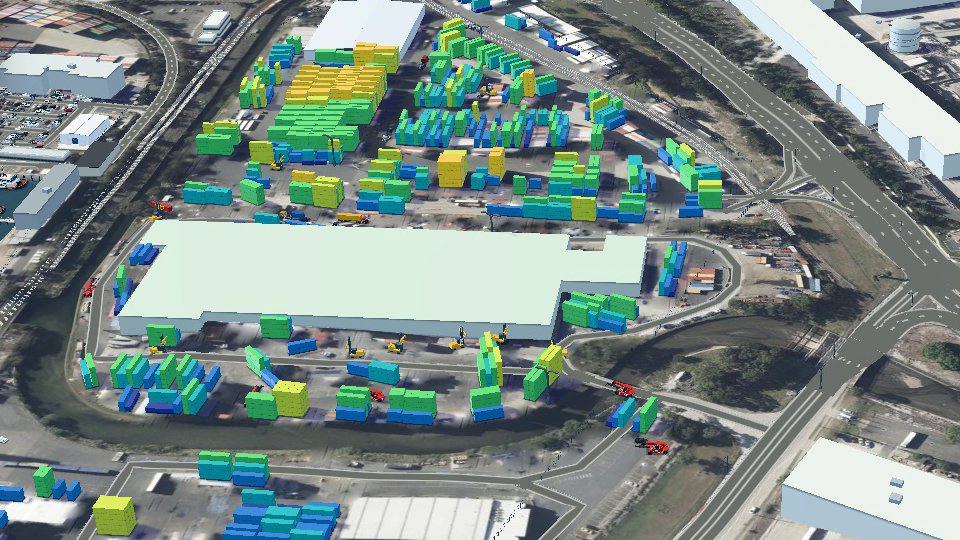
Summary: A port digital twin can start from public data alone. A 25 cm aerial photo gives container stack footprints, heights estimated from shadows, quay cranes and sheds, and open feeds add ships, weather and terrain. It cannot give the yard’s inventory or vehicle positions, so an honest twin labels those layers illustrative or simulated until the operator connects its own systems.
“Sunken tugboats against unmodelled berths.” That was our own review note on a 3D model of Port Botany, Sydney, and it was fair: tugs placed at sea level sat inside the terrain up to their cabins. The model covers a container park and the terminal next door, built for a global port operator without a byte of the operator’s data. Everything on screen came from public sources. That cuts both ways.
A 25 cm aerial photo is enough to count the containers
NSW Spatial Services publishes aerial imagery of Sydney at 25 cm a pixel, so a 40 ft container is about 49 pixels by 10. Our scanner squares up each block of stacks, cuts rows at the dark gaps and splits them into 20 ft and 40 ft slots. The first pass found 11,539 boxes: 4,492 in the park and 7,047 in the terminal. The same photo gave the sheds, 57 rail wagons and six quay cranes, found by their yellow booms over the water. (Our first crane positions came out mirrored, read from the wrong end of the quay. Automatic boom detection settled it.) The quay measured 935.4 m; the terminal publishes 936 m.
Height is harder. From above you see footprints, so tiers have to come from shadows. We calibrated the estimate so the median block stands 3.5 tiers and capped every stack at 6, and the cap bites: of the park’s 1,070 stacks, 327 (30.6%) landed on exactly 6. On screen, the colour-by-height panel carries a “modelled” badge.
Other public sources filled in the rest, the same open-data route we took for a photo-real city twin:
| Public source | What it gave the model |
|---|---|
| NSW Spatial Services imagery, 25 cm a pixel | stacks, sheds, wagons, cranes, quay edges |
| OpenStreetMap | building outlines, roads, rail, piers (after repairs) |
| Copernicus GLO-30 | terrain, one height every 32 m |
| Port Authority of NSW daily vessel movements | ship, agent, origin, berth and time |
| aisstream.io | AIS ship positions over a free WebSocket |
| Bureau of Meteorology, Sydney Airport | wind, gust, temperature, rain every 30 minutes |
| Transport for NSW freight dashboard | monthly truck turnaround at the terminals |
Placement rules decide which boxes survive
A detector knows nothing about planning law. Ours put boxes through the fence, inside sheds and into each other. So we wrote 60 placement rules, 54 of them traced to a published source, and made the pipeline enforce them. Four of them:
- Empty stacks in Port Botany lease areas stop at 7 high and laden ones at 5, under a NSW planning clause gazetted in 2020.
- A 20 ft box never sits on a 40 ft box, because a container’s strength is in its corners.
- A stack keeps at least 3 m from the boundary, and at least its own height.
- No container stands within 3 m of the nearest rail.
The rules cut the yard from 11,115 boxes to 9,934 (earlier fixes had already taken the scan down from 11,539). The demo now shows 3,688 boxes in the park and 6,246 in the terminal. Our wind cap, a lone row at 2 high, two rows at 4 and three at 5, is softer than the CTU Code’s table it reads from.
A 30 m terrain model floods the harbour
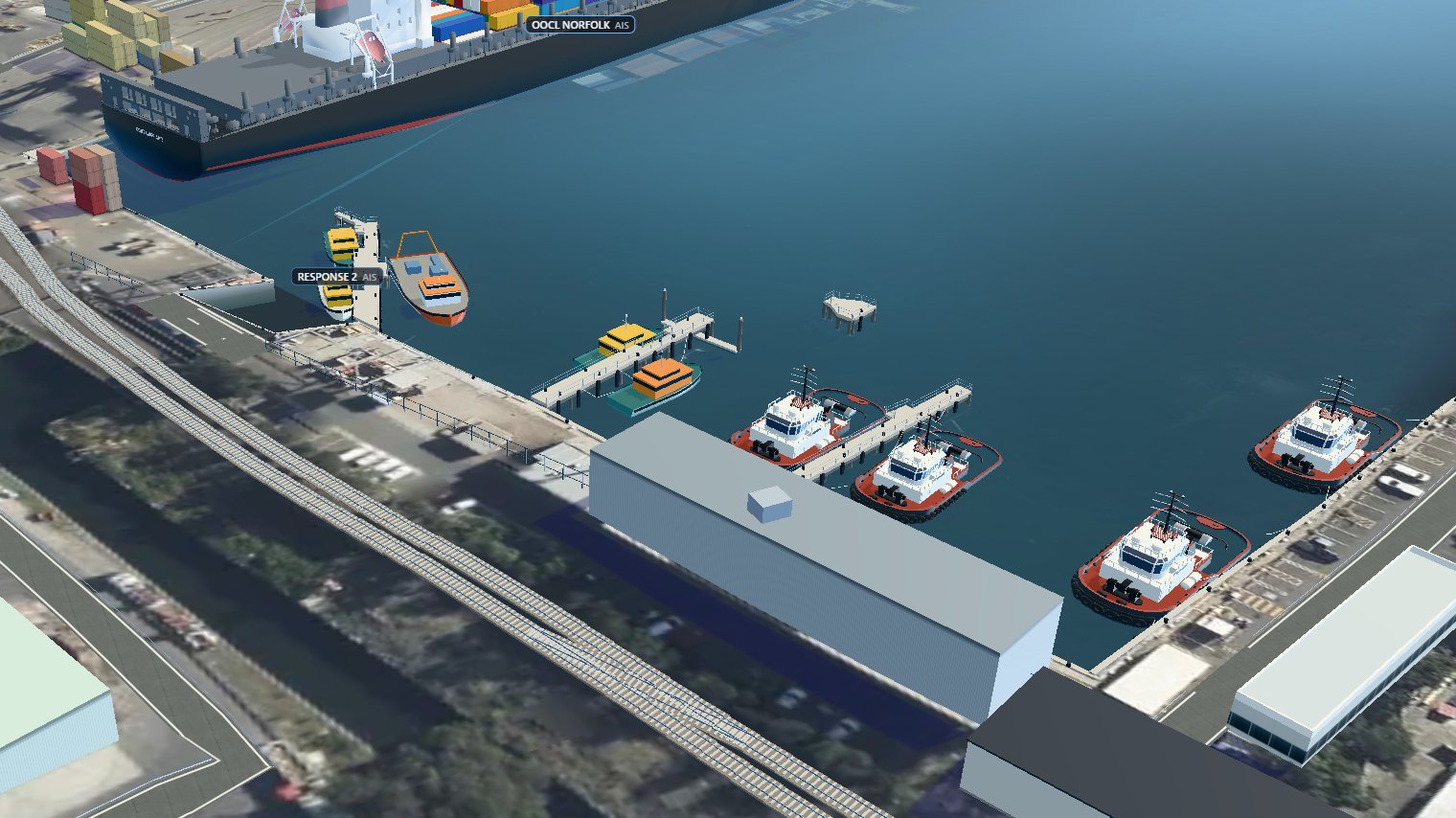
Copernicus GLO-30 holds one height every 32 m, so a 4 m quay wall smears about 30 m into the water. Beside the tug berths the sea read 0.7 to 3.2 m. And the boats in the aerial photo showed through it like wrecks.
Patching the terrain went nowhere: MapLibre throws “dem dimension mismatch” when a finer elevation tile meets coarser neighbours. So we left the terrain alone and drew the harbour over it:
- water at sea level, drawn over whatever the terrain wrote to the depth buffer;
- vertical quay walls, drawn the same way;
- a strip of quay at the terrain’s own height, drawn last, so the apron never shows water.
OpenStreetMap needed repairs too. Its coastline sat 4.6 m off at the harbour corner, so we traced the quay lines from the photo. Five boats in our own earlier trace had mirrored headings, so we can’t blame the map for everything. Any coastal twin on a 30 m terrain model has this bleed; plan the sea-level redraw as a standard step.
Public data stops where the operator’s systems start
The photo cannot say which box is which, who owns it or where a handler is now. Container inventory, vehicle GPS, crane and gate events are not public. But push image processing past that line and it invents things. Our car detector found 2,407 parked cars, nearly all of them shadows, lashing gear and box ends. We placed 915 cars in rows in the car parks instead.
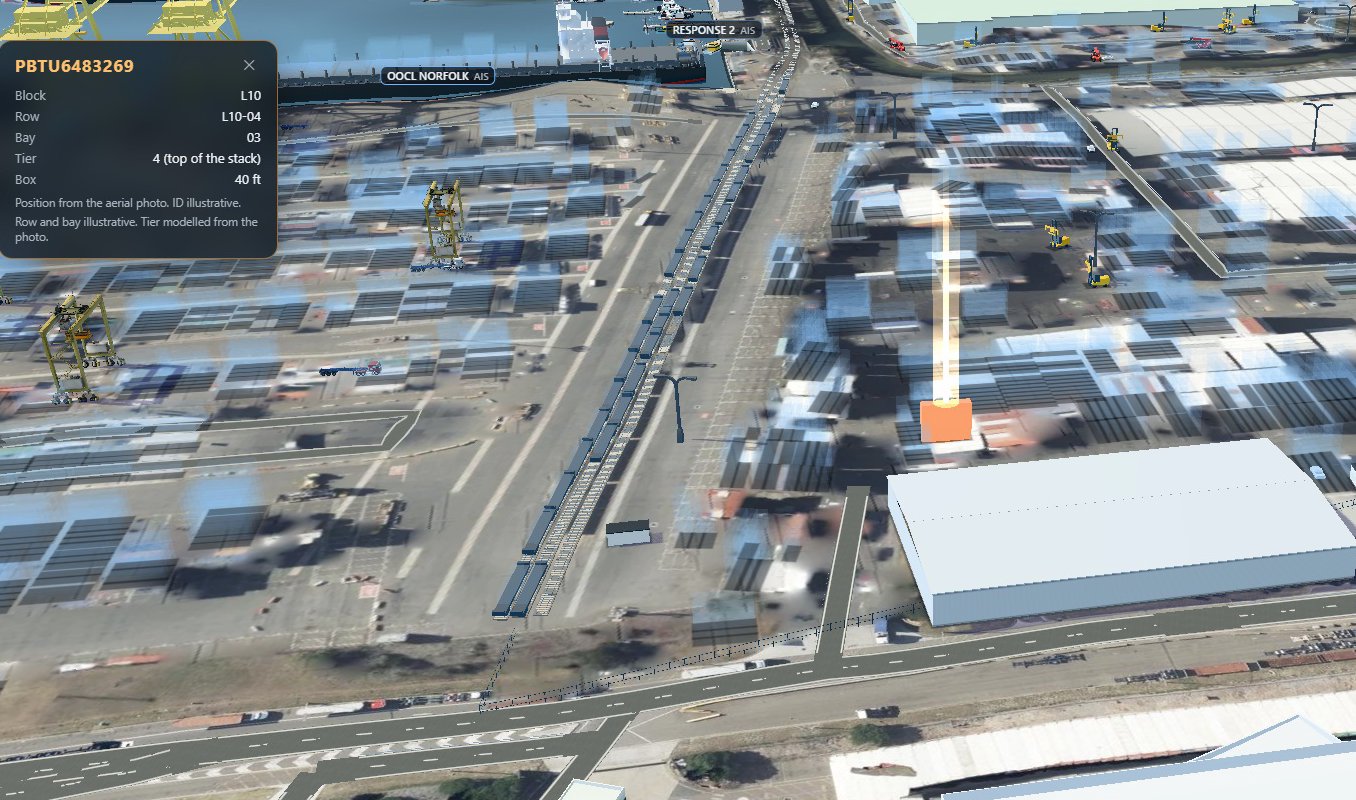
So the demo labels each gap. Its 32 vehicles run on a simulated GPS feed, and the feed badge and the footer say so. A tracker that goes quiet keeps its last valid position and turns stale after 30 seconds. Type a container ID and the yard turns to glass while one box glows; its card says the ID, row and bay are illustrative and the tier is modelled. The feed reader already takes a polled or WebSocket feed in the simulator’s format, so real telematics can replace it.
An audit against reality belongs in the build
We tested the demo against a reference model of container park operations, built from planning records, carrier terms, spec sheets and other operators’ safety procedures. It logged 54 findings: 23 wrong, 12 implausible, 7 missing, 12 fine. In the version we audited:
- 18 stacks crossed the fence line, and in 273 of 645 side-by-side pairs the boxes passed through each other;
- the lane graph came in two halves, so 24 of 50 vehicles could never reach the gate;
- light vehicles drove at up to 36 km/h on a site with a 20 km/h limit;
- straddle carriers stood in a terminal that runs rubber-tyred gantries.
Text is where overclaiming hides. The tour said every stack, shed and lane “is placed where the photo shows it”. It now says stacks are detected, heights estimated and lanes computed. An occupancy tile divided boxes by stacks times six, against a legal cap of seven, and became plain counts. The 19.7-minute truck turnaround tile stays, labelled as a terminals figure, because no park figure is published.
Port teams want a twin for three jobs
The three need very different amounts of the operator’s data.
- Presenting the site on a touch screen or a holographic display. The demo’s display mode has a bounded camera, 56 px controls and a site switcher.
- An operations view with vehicles, ships, weather and yard state on one screen. It is only as good as the feeds behind it.
- Induction training, a walk through the yard for new staff, on the web or as a VR scenario like our VR health and safety training.
What to check before you commission a port digital twin
- A list of layers, each marked as operator data, public data, modelled or simulated.
- On-screen labels for every modelled or simulated layer. Read the footer.
- The placement rules behind the yard, each with its source.
- What the screen does when a tracker goes quiet or a vehicle leaves the site.
- A low shot across the quay. Boats sitting low or water on the apron mean the terrain is too coarse.
- A model-vs-reality audit, signed off by someone from operations.
- Where it will run, and the camera limits and control sizes that screen needs.
Frequently asked questions
Can you build a digital twin of a port without the operator’s data?
For the physical layer, yes. Stack footprints, sheds, rail, cranes and the harbour come from a 25 cm aerial photo, OpenStreetMap and terrain data. Inventory, container IDs and vehicle positions stay illustrative or simulated, and labelled, until the operator connects its systems.
How accurate are stack heights estimated from shadows?
They are estimates, calibrated so the median block stands 3.5 tiers and capped at 6. At Port Botany 30.6% of park stacks hit the cap, so read the top band as “6 or more”.
Why does the sea flood the quay in a 3D port model?
Copernicus GLO-30 holds one height every 32 m, so a 4 m quay smears about 30 m into the water. We left the terrain alone and redrew the water and quay walls over it at sea level.
What does a port twin show before GPS data is connected?
A simulated feed, labelled on screen. Our demo runs 32 vehicles, a truck visit through the gate and a tracker that goes quiet on purpose, so the stale and offline states can be seen.
Next step
Start with what the public record already holds, then add your own feeds where they pay their way. See our digital twin work or get in touch.
What we build: digital twins in the UAE.
